PROJECTS
Clearflow - Product Redesign
Client:
Clearflow Financial
Year:
2026
Location:
Wilmington, DE, US
Service:
UI/UX Redesign
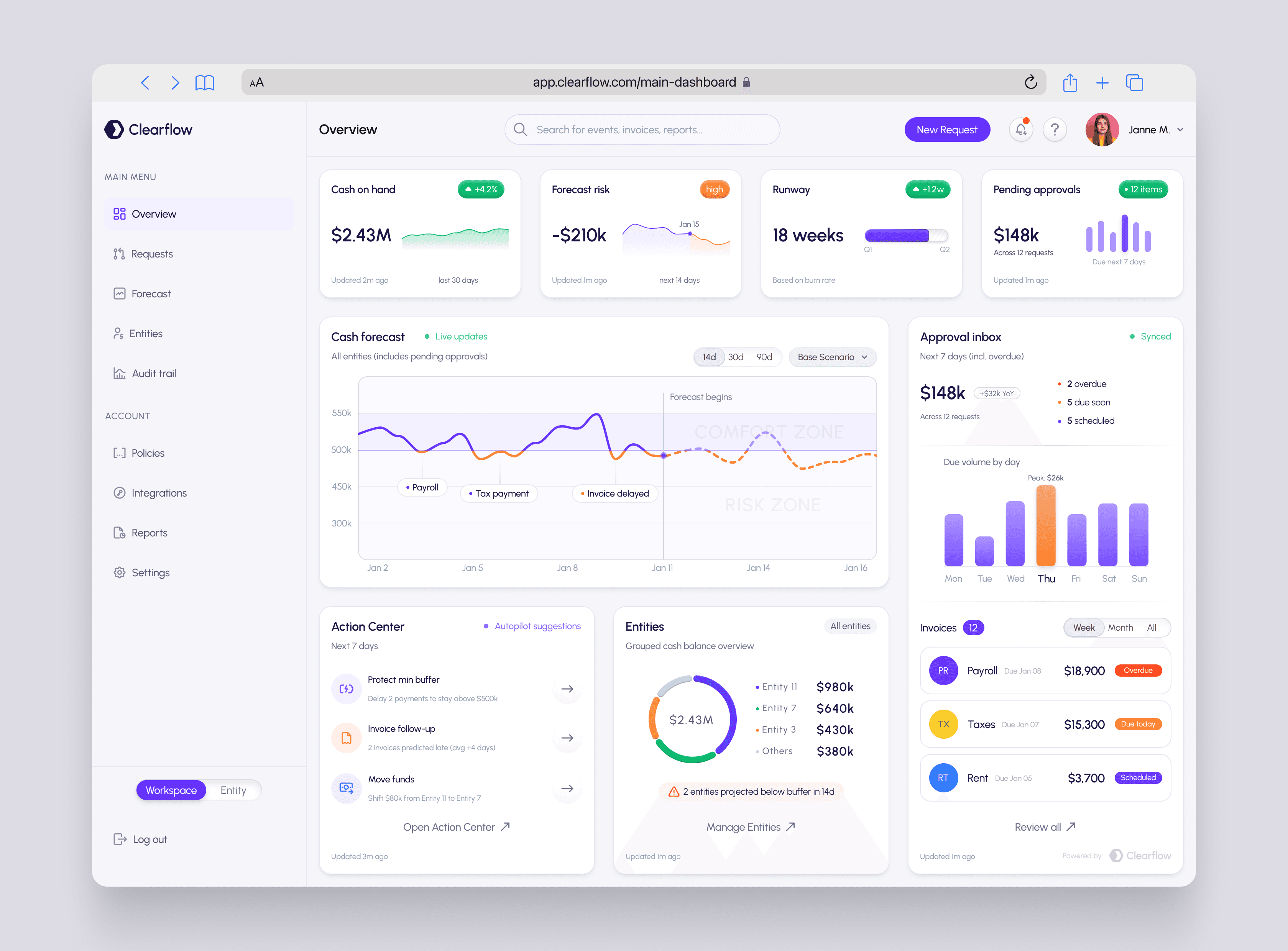
Project Overview
Category: Fintech SaaS/B2B Finance Ops
Deliverables: UX strategy, dashboard architecture, UI system, component library, finalized UI
Timeline: 5 weeks
DAR Design role: UX/UI design team
Clearflow is an AI-powered treasury & approvals platform for finance teams. The product connects bank feeds, forecasts cash, and routes payables through policy-based approvals — with audit-ready evidence built in.
What we redesigned in this phase:
Main Dashboard (Overview): executive visibility + cash forecasting + actionable approvals.
Requests: operational inbox to review, approve, schedule, and reject payments across entities.
Primary objective
Turn the product into a “control room” for finance teams: fast understanding → safe decisions → minimal follow-up chaos.
The business context (why this mattered)
Finance teams don’t need “more data.” They need:
clarity of priorities (what’s urgent vs noise)
confidence in decision-making (status, context, and risk are visible)
speed without mistakes (approve/schedule with guardrails)
audit defensibility (traceable actions, consistent states)
Reality of daily work
Requests come from systems + bots + humans (AP tools, schedulers, internal teams)
Decisions happen under time pressure (payroll, taxes, infrastructure, vendors)
Multi-entity complexity is normal (HQ + EU + US + UK, etc.)
The cost of a wrong click is high (money + trust + compliance)
The problem (product UX friction we targeted)
This is the typical dashboard failure pattern in finance SaaS:
“Overview” screens become a wall of charts with no clear action path
Approvals live in a separate place → context switching and missed due dates
Status language is inconsistent → misinterpretation risk
Forecasting looks impressive but stays non-actionable
Users waste time hunting for:
what changed
what needs approval
what is overdue
what can be safely scheduled
Goals & success criteria
Business goals
Increase speed of approvals while reducing mistakes
Reduce time-to-understand the current situation to < 10 seconds
Make multi-entity operations feel structured, not chaotic
UX success criteria
A user should instantly answer:

Solution summary (what we shipped)
We built two complementary experiences:
1) Overview Dashboard = decision cockpit
Executive snapshot at the top (cash / risk / runway / approvals)
Forecast becomes actionable (events + confidence zones + scenarios)
Approvals are visible inside the same workspace (not hidden behind navigation)
2) Requests = operational inbox
Scannable list with consistent status system
Split-view details so users can decide without bouncing between pages
Clear primary actions: Approve / Schedule / Reject
Activity timeline supports trust + audit readability
Design process (high-level)
Structured the product around two modes:
Monitor mode (Overview): understand + anticipate
Operate mode (Requests): decide + execute
Defined a consistent status language and visual semantics
Built a reusable component system: pills, badges, row states, cards, charts
Key UX principles applied (without turning it into “UX theater”)
Visibility of system status: “Synced”, “Updated … ago”, statuses, overdue flags
Recognition over recall: chips, pills, consistent placement of due/status/entity
Error prevention: scheduling as a first-class action, not an afterthought
Consistency & standards: same patterns across dashboard cards + list + details
Aesthetic minimalism: calm UI with dense information that still breathes
Progressive disclosure: summary first, detail on demand (split view)
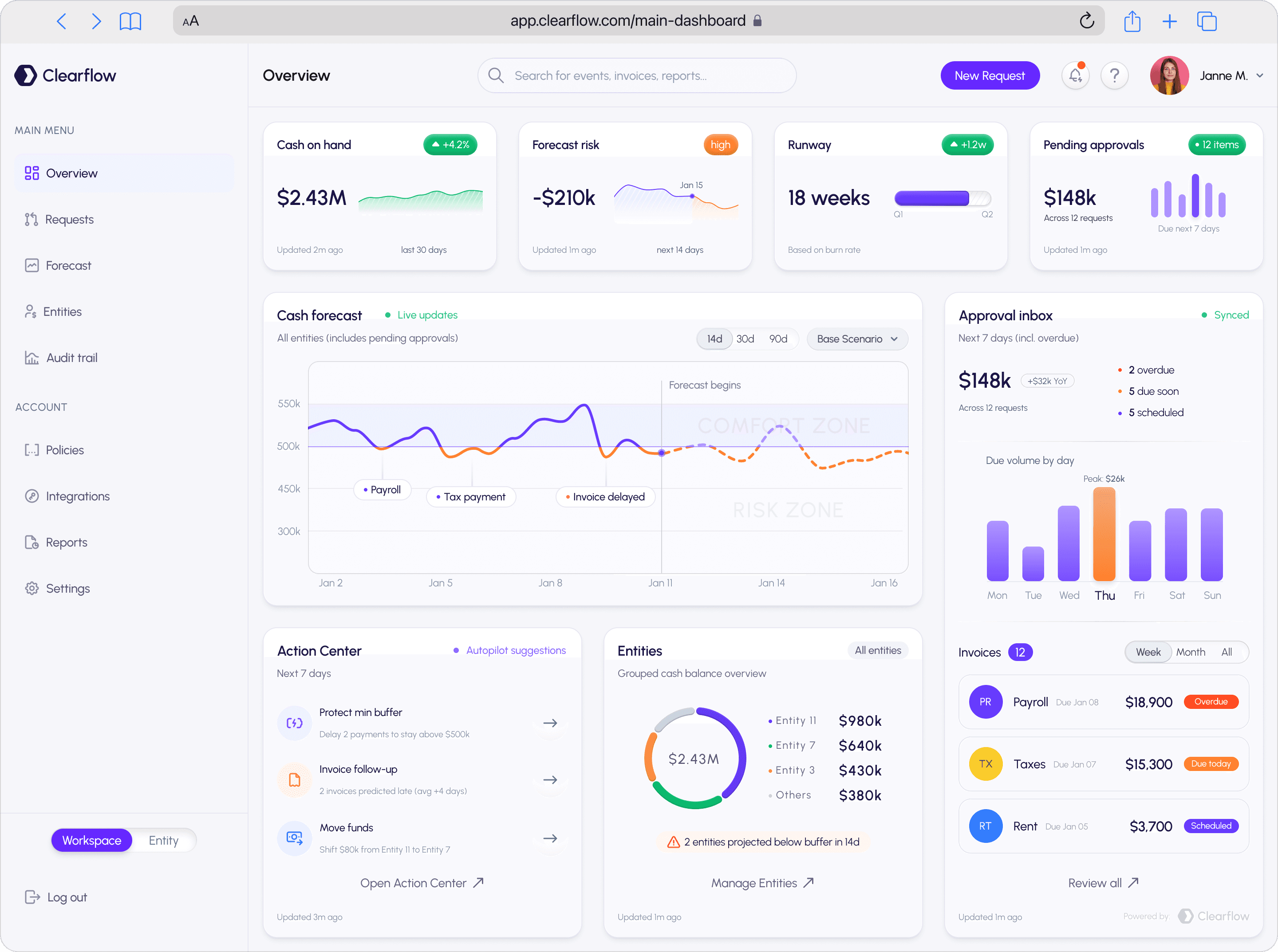
A. Top KPI row — “state of the business in 8 seconds”
We placed four cards that answer the core finance questions immediately:
Cash on hand → current reality
Forecast risk → near-future danger signal (risk tag: e.g., “high”)
Runway → leadership-friendly metric (weeks, not spreadsheets)
Pending approvals → operational workload (count + next 7 days)
Why this works:
Converts abstract finance into action framing
Reduces cognitive load: one row = one mental model (“where are we now?”)
B. Cash Forecast module — turning a chart into a decision tool
This chart isn’t decoration. We made it readable and operational.
Key mechanics:
Time range controls: 14d / 30d / 90d
Scenario switch: Base Scenario (expandable for alternatives)
“Live updates” status cue
Event markers + labeled chips (e.g., Payroll, Tax payment, Invoice delayed)
Visual boundary: Forecast begins (separates known past from predicted future)
Confidence framing through zones (comfort vs risk)
Why it matters:
Finance teams trust forecasts more when:
they see what drives the curve (events)
they can switch horizons quickly
prediction is clearly separated from historical reality
C. Approval Inbox on the dashboard — approvals stop being a separate universe
We placed an Approval inbox panel right next to forecasting.
What’s inside:
Total approval volume + delta indicator
Clear urgency buckets:
overdue
due soon
scheduled
“Due volume by day” chart for workload anticipation
Why it matters:
Approvals are not “admin work” — they directly impact forecast and runway
Putting approvals next to forecast connects:
risk visibility → decision execution
D. Invoices list — a compact “today’s battlefield” view
We included a short list of invoice-like items with strong scanning structure:
Icon + label (e.g., Payroll, Taxes, Rent)
Due date + urgency micro-labels (Overdue / Due today / Scheduled)
Amount aligned for fast comparison
Filter controls (Week / Month / All)
Why it matters:
Users need to act, not admire dashboards
This list creates a reliable daily routine: open dashboard → handle top items
E. Action Center — “what should I do next?”
Instead of passive reporting, we added an Action Center with suggestions:
“Protect min buffer” (delay payments to stay above threshold)
“Invoice follow-up” (late predictions, averages)
“Move funds” (entity-to-entity transfer suggestion)
Why it matters:
It’s decision support, not “AI hype”
It reduces analysis paralysis: the dashboard proposes the next move
F. Entities module — multi-entity reality, visible without complexity
We designed entity visibility as a compact overview:
Donut overview + per-entity breakdown
Quick filter (“All entities”)
Risk callout (e.g., “2 entities projected below buffer in 14d”)
Why it matters:
Multi-entity is where finance dashboards usually die
This pattern keeps complexity contained: overview first, drill-down later
risk visibility → decision execution
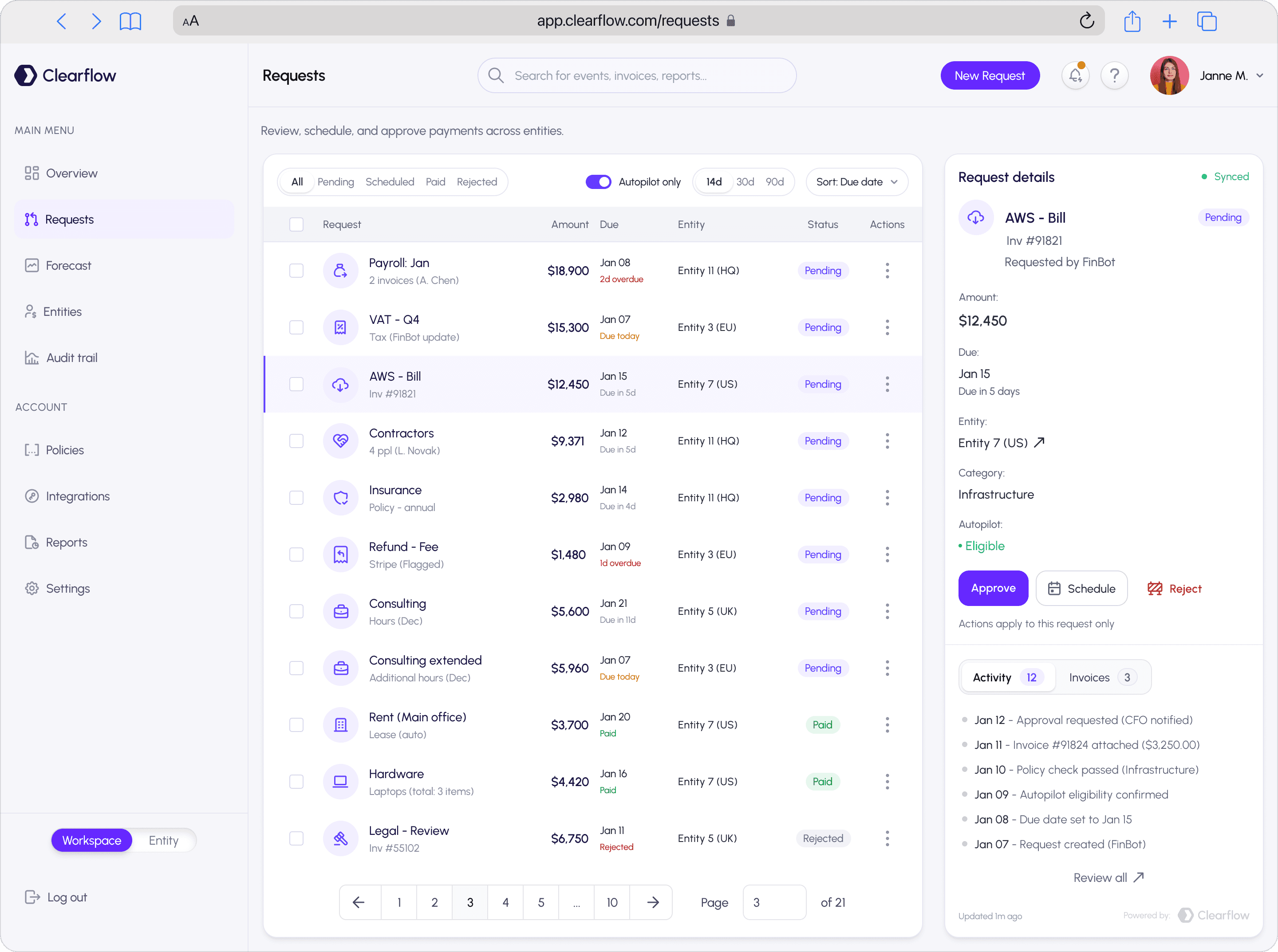
A. Filters that match how finance teams think
We made the top controls feel like a real workflow:
Status tabs: All / Pending / Scheduled / Paid / Rejected
Autopilot visibility: Autopilot only toggle
Time horizon: 14d / 30d / 90d
Sorting: Sort: Due date
Why it matters:
These are real mental filters:
“Show me what needs action”
“Show me what Autopilot can handle”
“Show me what’s coming soon”
B. Table design — scan-first, mistake-resistant
Each row is structured for speed:
Checkbox for bulk intent (but not forced)
Clear primary label (request name)
Secondary info beneath (invoice / requester / notes)
Amount aligned in a single column for comparison
Due date paired with urgency label (Overdue / Due today / Due in X days)
Entity shown consistently (HQ/EU/US/UK)
Status pill (Pending / Paid / Rejected)
Row-level actions via kebab menu
Why it matters:
Finance work is repetitive; the table must support:
fast scanning
low error rate
consistent interpretation
C. Split-view details — decisions without page jumping
The right panel keeps context stable:
What it shows:
Sync status (“Synced”)
Request identity (vendor, invoice, requester)
Key decision fields:
Amount
Due date
Entity (with external-link affordance)
Category
Autopilot eligibility
Primary actions:
Approve
Schedule
Reject
Activity + Invoices tabs with counters
Timeline: visible chain of events (request created → checks passed → approvals requested)
Why it matters:
Reduces context switching (list stays visible)
Supports audit reasoning (“why is this eligible / who touched this / what happened”)
Makes “Approve” a confident action, not a gamble
Key UI system decisions (why the product feels calm, not cluttered)
Visual direction
“Calm control” — finance UI should feel governed and predictable
Component language
Pills for states and filters (fast scanning)
Soft cards for hierarchy without heavy borders
Tight but breathable spacing for high-density information
Consistent iconography per request type (payroll, tax, infra, etc.)
Status semantics
Pending / Scheduled / Paid / Rejected as core states
Overdue / Due today / Due soon as urgency overlays
(so urgency doesn’t break the base state system)
Results/impact (what this redesign is built to achieve)
This product experience is designed to:
Reduce time-to-action on approvals (Approve/Schedule is always one step away)
Reduce missed due dates through visible urgency cues
Improve trust in forecasting by tying curves to real events
Make multi-entity operations readable and contained
Increase audit defensibility through a clear activity history

PROJECTS