PROJECTS
Clearflow – Website Redesign
Client:
Clearflow Financial
Year:
2026
Location:
Wilmington, DE, US
Service:
UI/UX Redesign
Project Overview
Clearflow is an AI-powered treasury & approvals platform for modern finance teams. It connects bank feeds, forecasts cash, and automates payables through policy-based approvals, guardrails, and audit-ready evidence — without spreadsheets.
Industry: B2B SaaS / Finance Ops / Treasury Automation
Primary objective: Convert high-intent traffic into demo requests by clarifying value, reducing perceived risk, and making the product tangible in under 20 seconds.
Scope: Homepage information architecture, messaging + UX copy, UI direction, and key section design (hero → CTA).
DAR Design role: UX/UI design team
The business context
Finance teams don’t “browse” tools. They evaluate risk.
What Clearflow sells (in plain terms)
Cash forecast you can trust (bank feeds + AI projections)
Approvals that route themselves (role-based workflow)
Guardrails that prevent bad payments (policy rules + buffers)
Audit proof that’s ready instantly (evidence pack, trails, logs)
Buying reality (what affects conversion)
Buying committee: Controller / Finance Ops lead (champion) + CFO (sign-off) + IT/Security (blocker)
Sales motion: demo-request → discovery → security review → implementation
Primary friction: skepticism around “AI” + security/compliance anxiety + fear of disruption (“another system to babysit”)
The problem
We treated this as a “category problem” that kills conversion in finance SaaS:
The story is often feature-first instead of risk-first
“AI” gets positioned as hype, not as guardrails + auditability
Pages overload visitors with options early (high cognitive load → drop-off)
Proof appears too late (logos, security, outcomes buried below the fold)
Product stays abstract (no concrete workflows → low trust)
Goals & success criteria
Business goals
Increase demo-request conversion from qualified traffic (search, referrals, comparison pages)
Shorten time-to-understand to < 20 seconds for first-time visitors
Reduce security anxiety early (SOC 2, encryption, audit trails) without turning the hero into a compliance wall
UX success criteria (what “good” looks like)
A visitor can answer 3 questions instantly:
What is this?
Why is it safer/faster than spreadsheets?
What should I do next?
Clear two-lane CTA:
Primary: Request a demo
Secondary: View product tour (lower commitment)

Target users & Jobs-to-be-Done
Primary users (who feel the pain daily)
Controller / Finance Ops Lead
JTBD: “Help me stop chasing approvals, keep cash predictable, and prevent stupid mistakes.”
Anxiety: edge cases, audit defensibility, implementation risk
Secondary users (who can kill the deal)
CFO / Head of Finance
JTBD: “Give me control and confidence without slowing the business.”
Anxiety: cash surprises, governance, accountability
Security / IT
JTBD: “Don’t introduce a compliance incident.”
Anxiety: SSO, access control, data retention, vendor posture
Section-by-Section Breakdown (what we did and why)
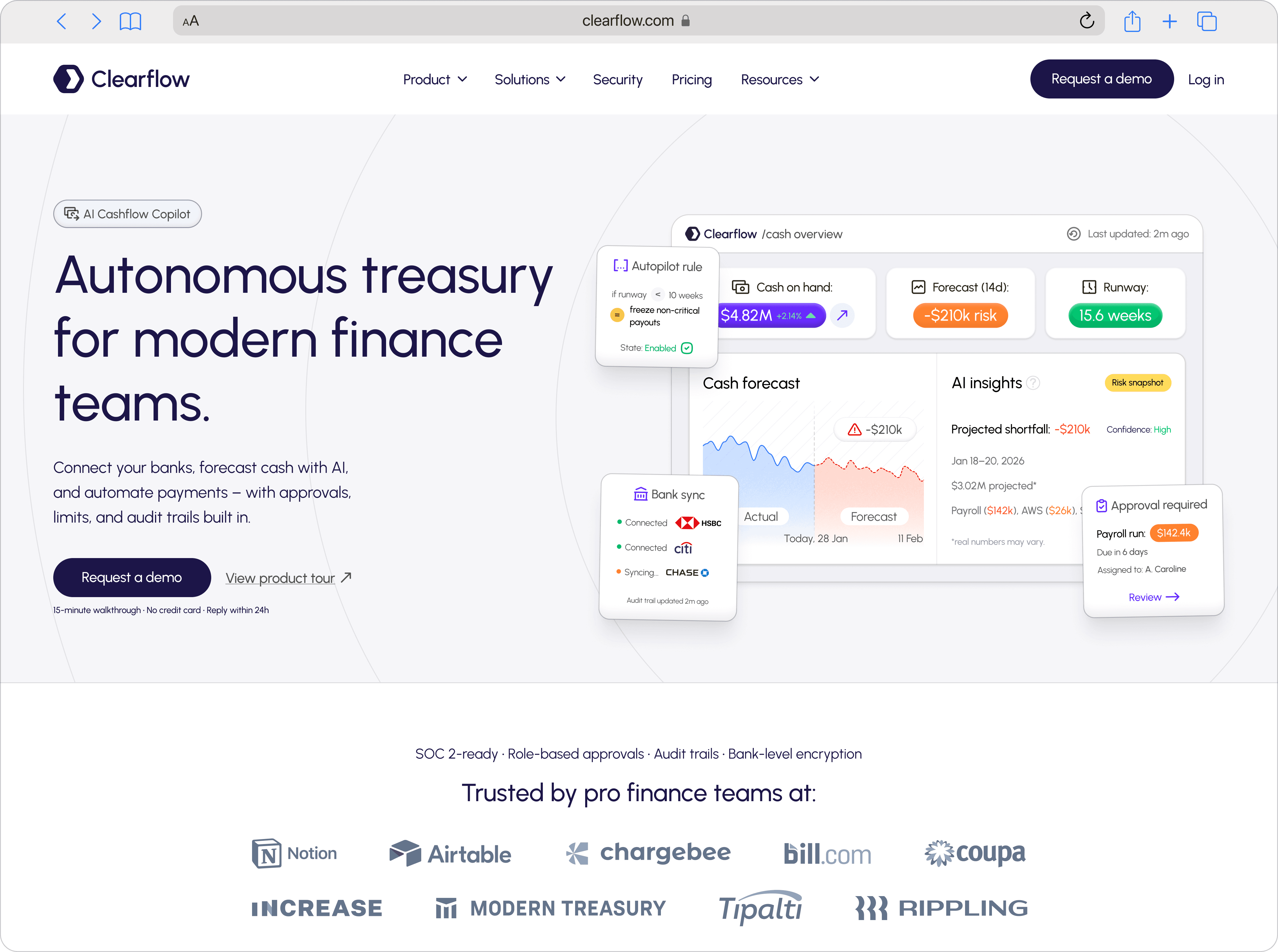
1) Hero section — “Autonomous treasury for modern finance teams”
Intent
Create instant category clarity + credibility + action.
What we changed conceptually
From: “AI cash forecasting tool” (sounds like a feature)
To: “Autonomous treasury” (sounds like a system you run)
Copy strategy
Headline: high-level promise, category anchored (“treasury” + “finance teams”)
Subhead: concrete verbs + scope (“Connect banks”, “forecast”, “automate payments”, “approvals/limits/audit trails”)
Microcopy under CTA: risk reversal (“15-min walkthrough”, “No credit card”, “Reply within 24h”)
UX principles used
Match between system and real world: treasury/approvals/audit are familiar terms
Visibility of system status: “last updated” + “risk snapshot” cues in UI mock
Aesthetic-usability effect: calm, controlled UI reduces perceived risk
UI decisions
Main UI mock shows three “executive” outcomes:
Cash on hand
14d forecast risk
Runway weeks
Floating cards reinforce “guardrails”:
Autopilot rule (buffer threshold/freeze payouts)
Bank sync status
Approval required card (payroll run)
2) Trust bar — logos + security signal line
Intent
Remove the biggest blocker: “can this be trusted with money?”
Why is it directly under hero
Finance buyers scan for legitimacy before reading.
SOC 2-ready + role-based approvals + audit trails + bank-level encryption
“Trusted by pro finance teams at:” + recognizable brands
UX principles used
Social proof early (reduce risk)
Signal hierarchy: trust cues before deep features
3) “Cash ops on autopilot” — 4 core pillars
Intent
Explain the product in a way a Controller can repeat to a CFO in one sentence.
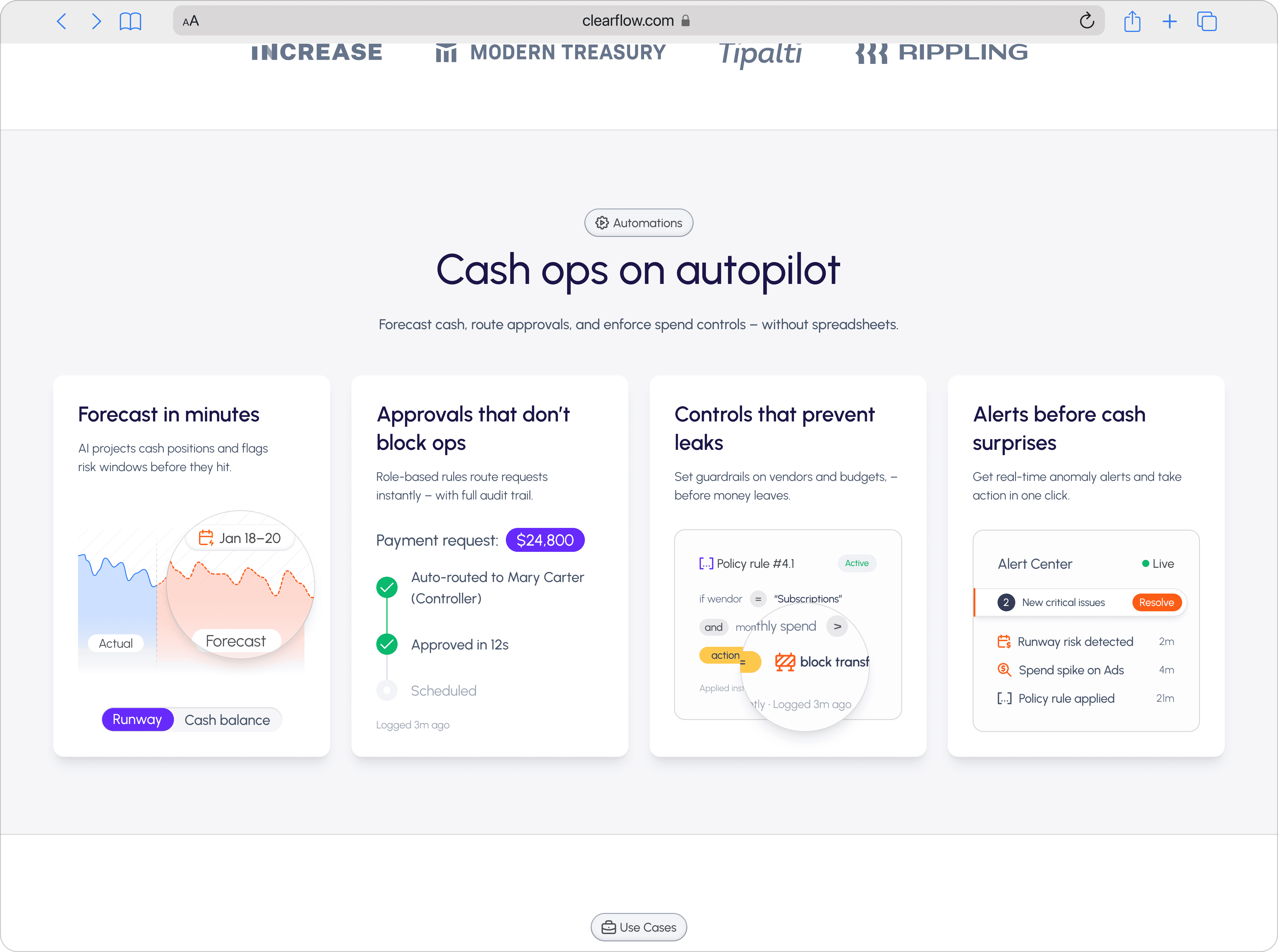
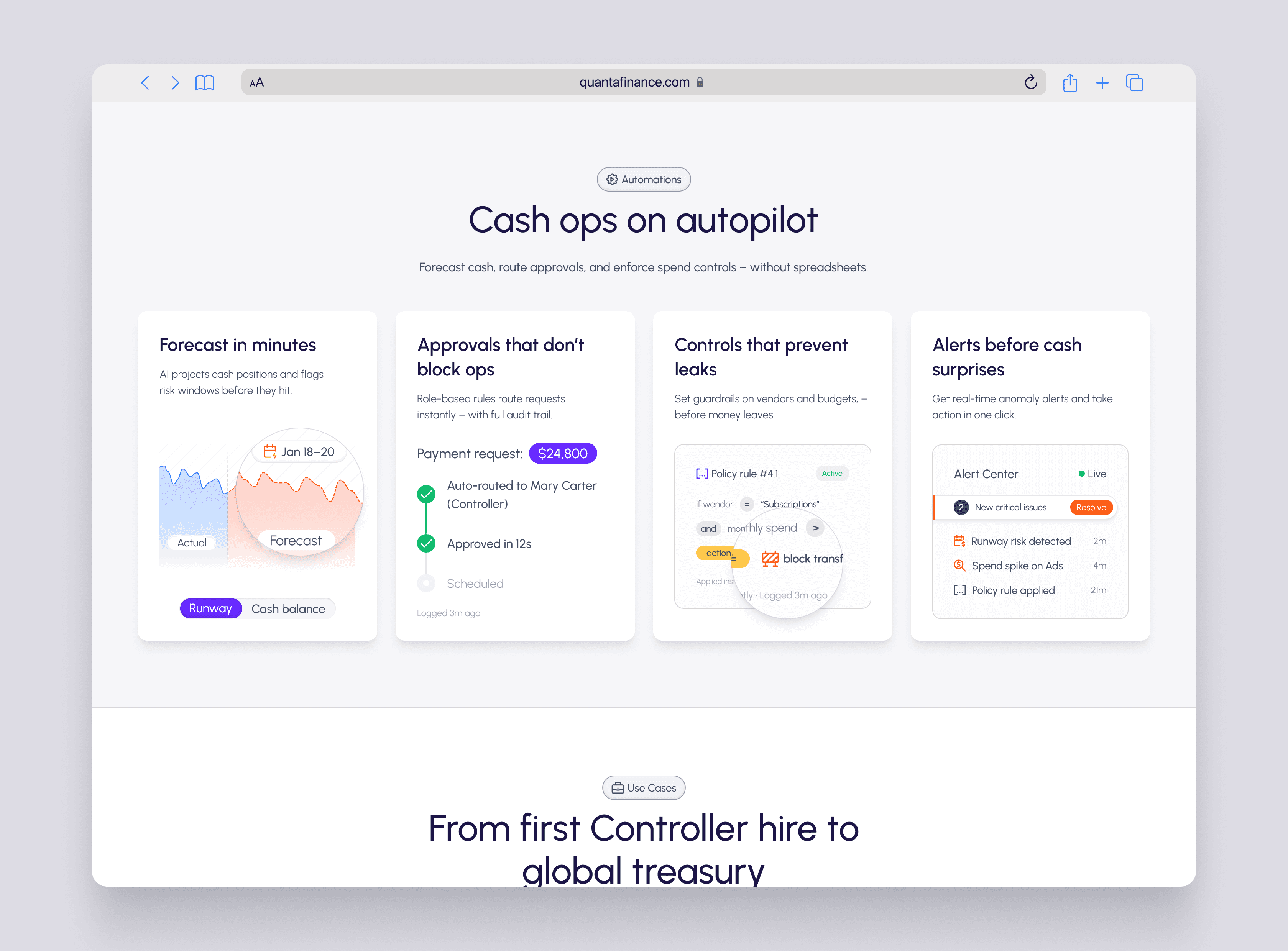
Structure (each card = one job)
Forecast in minutes
Approvals that don’t block ops
Controls that prevent leaks
Alerts before cash surprises
Why 4 pillars
It maps cleanly to how finance teams think:
See the future (forecast)
Move money safely (approvals)
Prevent mistakes (controls)
Catch anomalies (alerts)
UX principles used
Gestalt/proximity: consistent cards reduce scanning cost
Recognition over recall: each pillar has a “mini UI proof”
Error prevention: controls + guardrails positioned as primary value
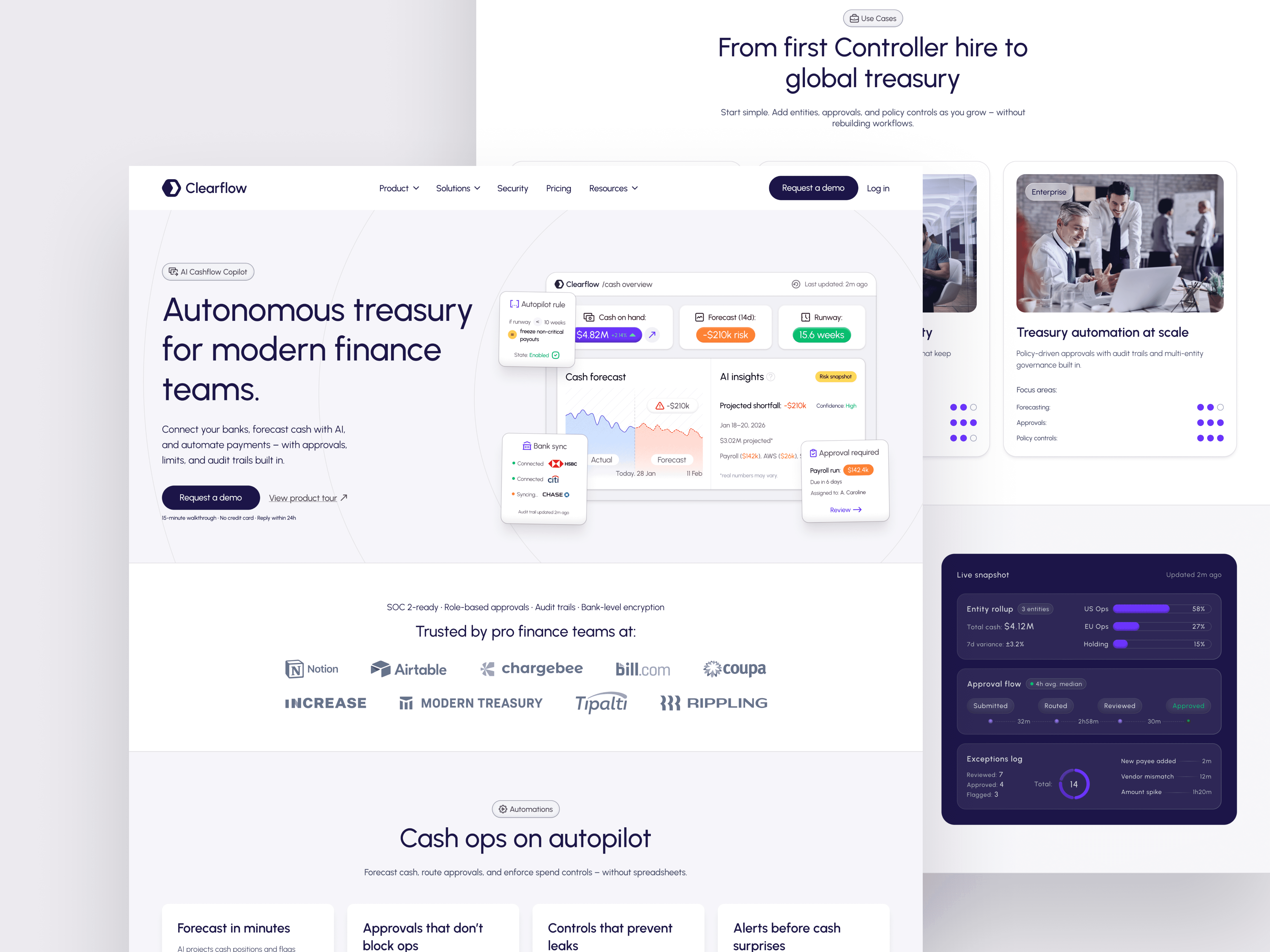
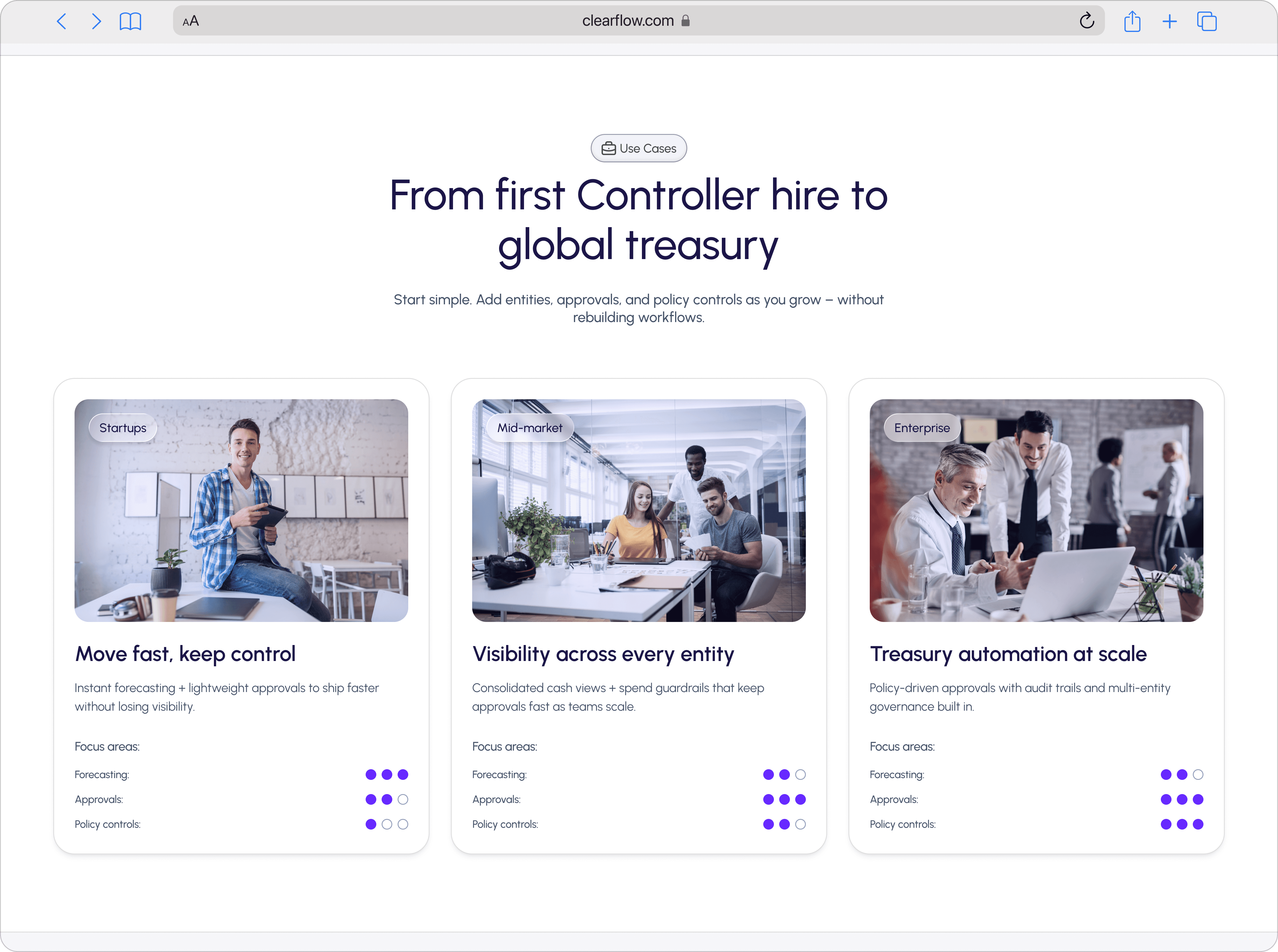
4) Use cases — “From first Controller hire to global treasury”
Intent
Show scalability without rebuilding workflows.
Why this section exists
Most finance tools fail at the handoff:
startup ops → mid-market processes → enterprise governance
We framed the value as: start simple, grow without re-implementing.
Content mechanics
Three cards: Startups / Mid-market / Enterprise
Each includes:
a short narrative (“Move fast, keep control”)
focus areas (forecasting, approvals, policy controls)
a dot matrix to visually communicate maturity fit
UX principles use
User control & freedom: “you can adopt gradually”
Progressive commitment: removes “big migration” fear
5) Impact section — “Results you can measure in 30 days”
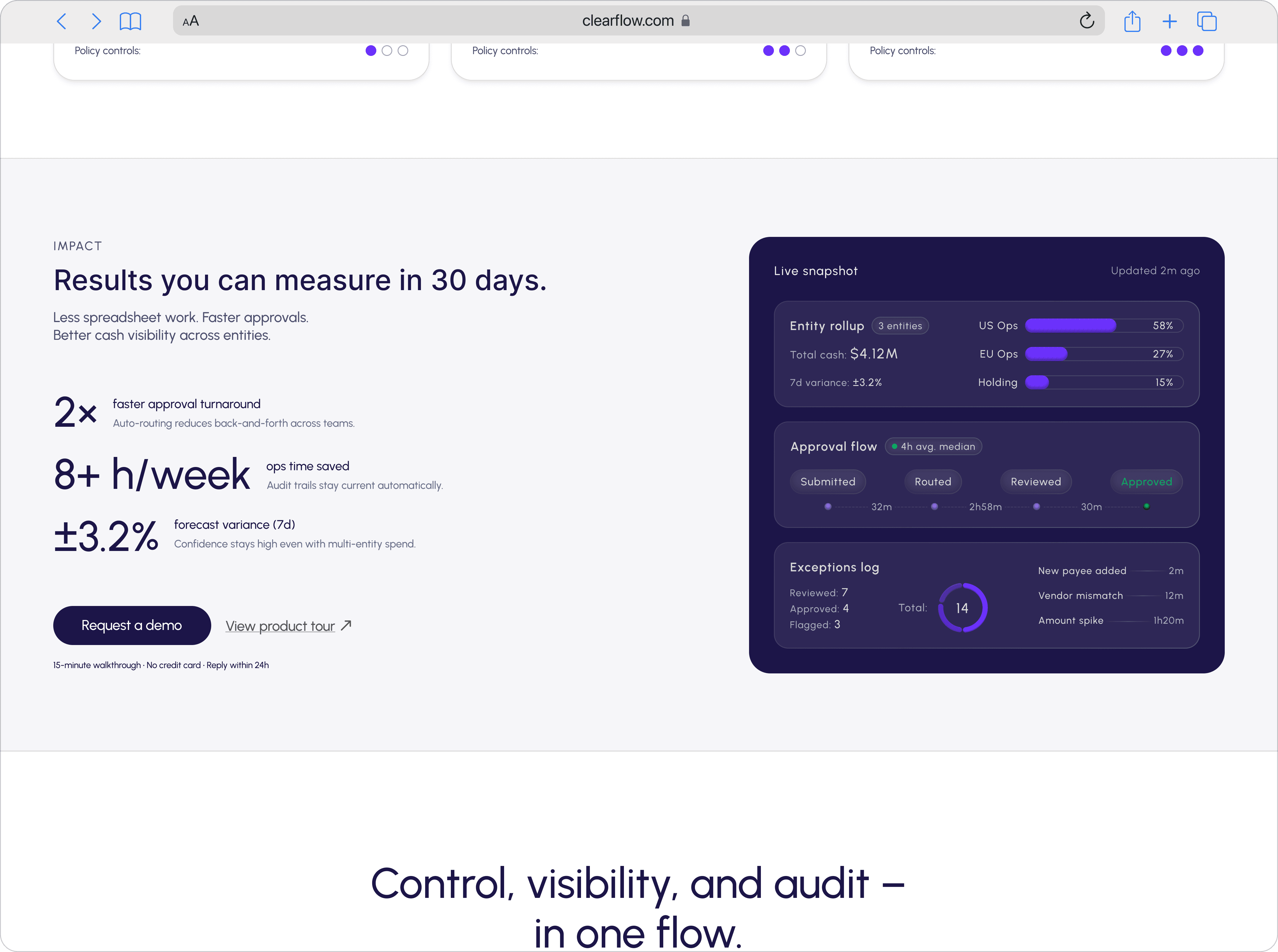
Intent
Shift from “features” to outcomes.
What we show
2× faster approval turnaround
8+ h/week ops time saved
±3.2% forecast variance (7d)
Why 30 days framing works
Finance teams want proof fast; “30 days” feels testable
Even if outcomes vary, the mental model is: this is measurable
UX principles used
Outcome framing increases perceived ROI
Anchoring: sets expectation for what “good” looks like
Risk reversal: still offers “product tour” as secondary
6) Workflow section: “Control, visibility, and audit — in one flow”
Intent
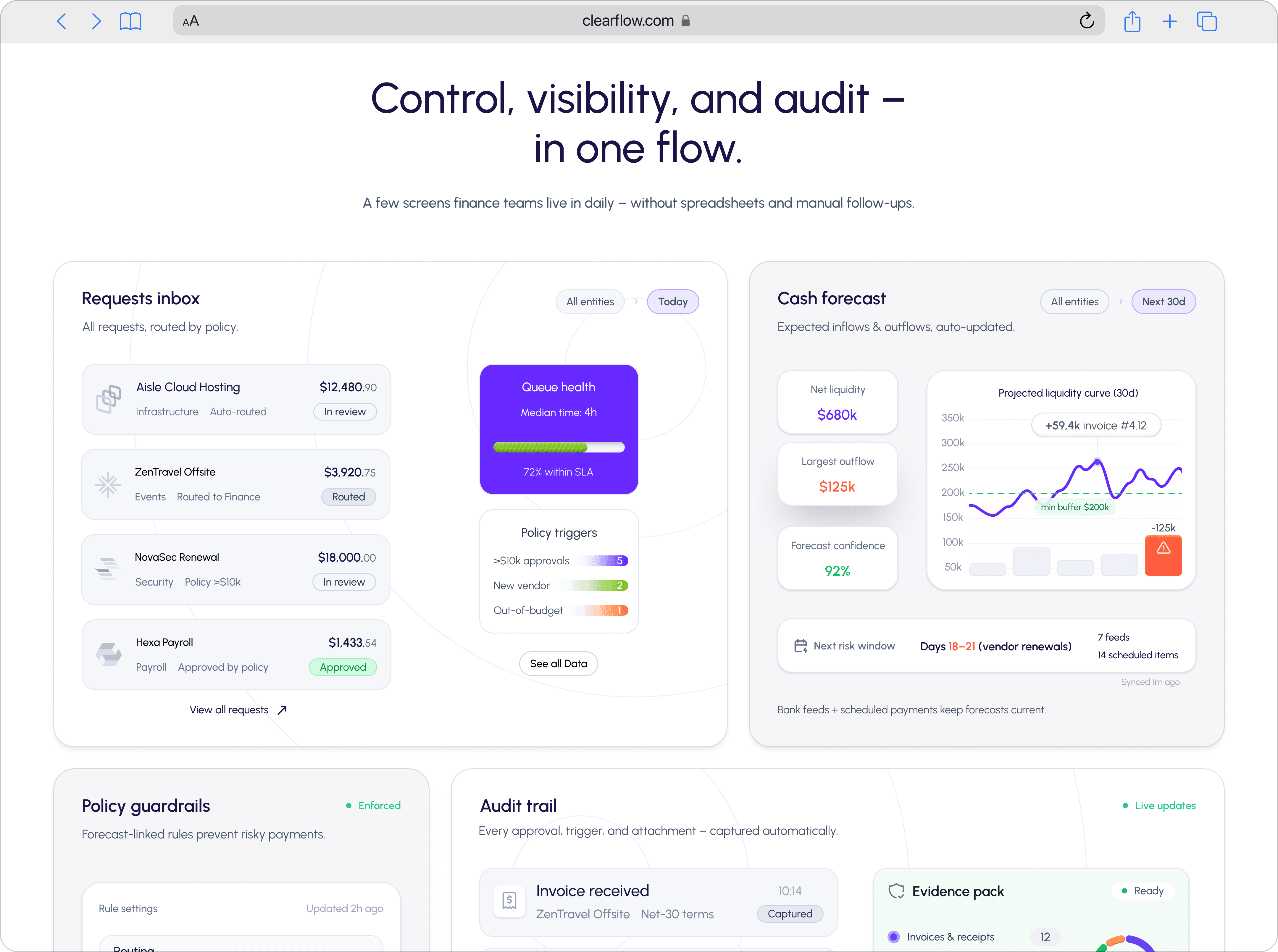
Make the product concrete for evaluators who need to see how it works.
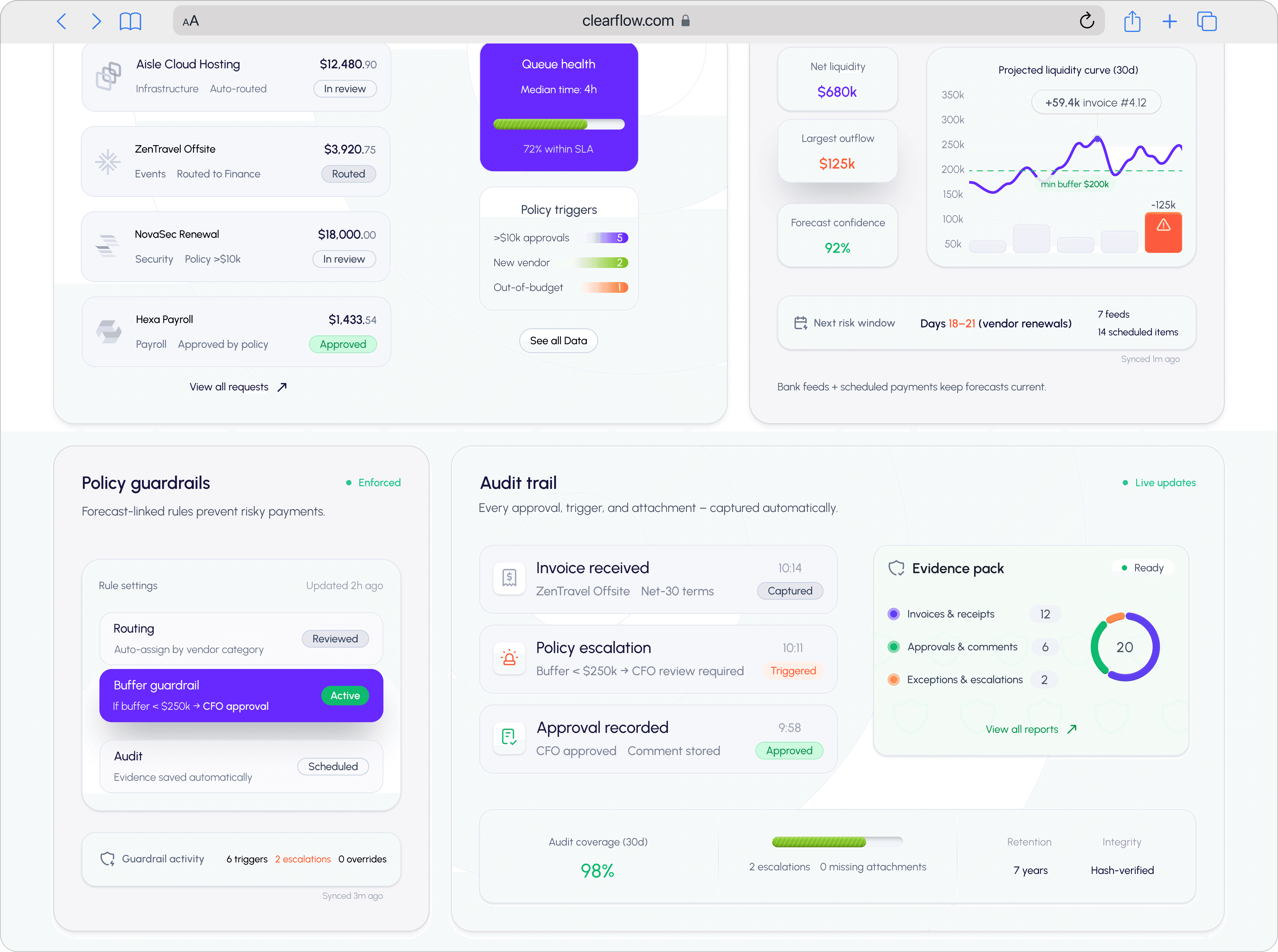
Why a “screen mosaic”
It compresses the product into a single mental model:
Requests come in → policy applies → approvals route → audit trail captures → evidence pack exports
Micro-stories inside the UI
Requests inbox with statuses and routing
Cash forecast with confidence + risk window
Policy guardrails tied to a buffer
Audit trail with “captured/triggered/approved” events
Evidence pack with counts (invoices, approvals, comments, exceptions)
UX principles used
Visibility of system status (Nielsen)
Consistency & standards (repeat UI patterns)
Error prevention (guardrails as default)
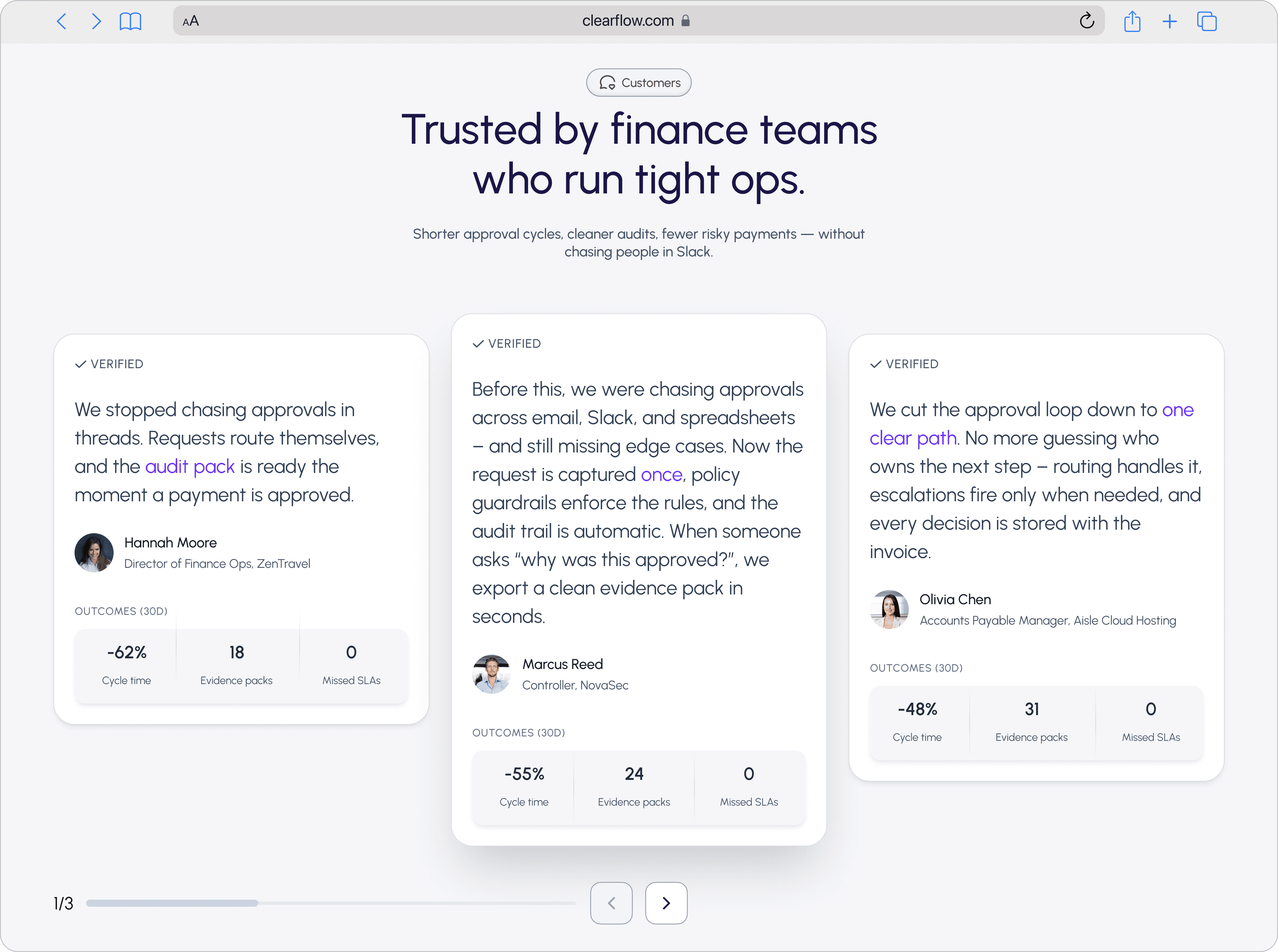
7) Customers section — verified quotes + outcomes
Intent
Make the product concrete for evaluators who need to see how it works.
What we did differently
Added Verified label (trust cue)
Quotes focus on:
eliminating approval chasing
one clear path of ownership
instant audit evidence
Outcomes presented as small, scannable stats (cycle time, evidence packs, SLAs)
UX principles used
Social proof + specificity beats generic praise
Scan-first layout for busy buyers
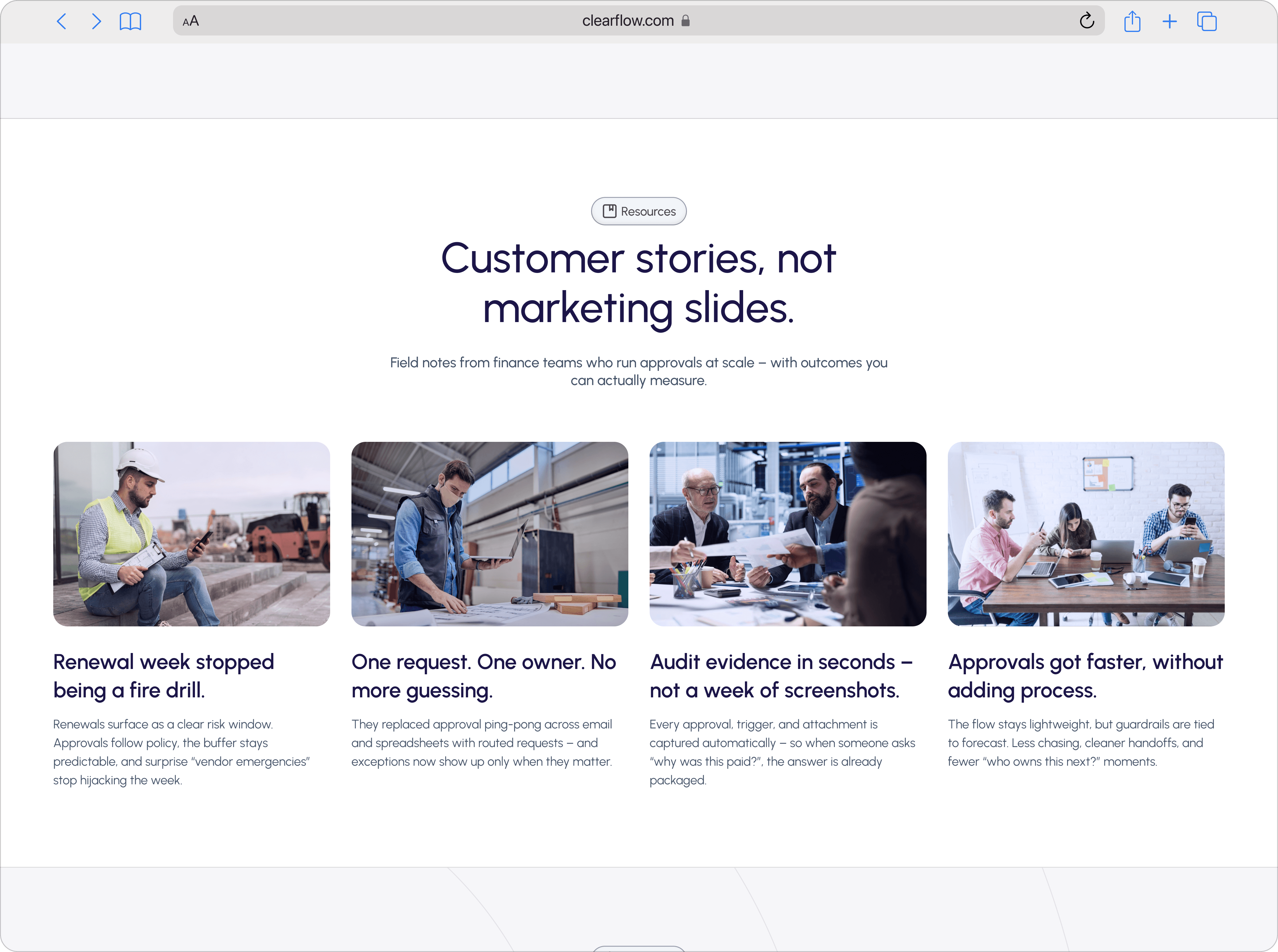
8) Resources — “Customer stories, not marketing slides”
Intent
Give skeptics a self-serve path instead of forcing a demo.
Why it’s positioned late
Only visitors who are still reading want deeper evidence.
Copy angle
“Field notes” + measurable outcomes
Headlines written as operational wins, not brand fluff:
“Renewal week stopped being a fire drill.”
“One request. One owner. No more guessing.”
“Audit evidence in seconds — not a week of screenshots.”
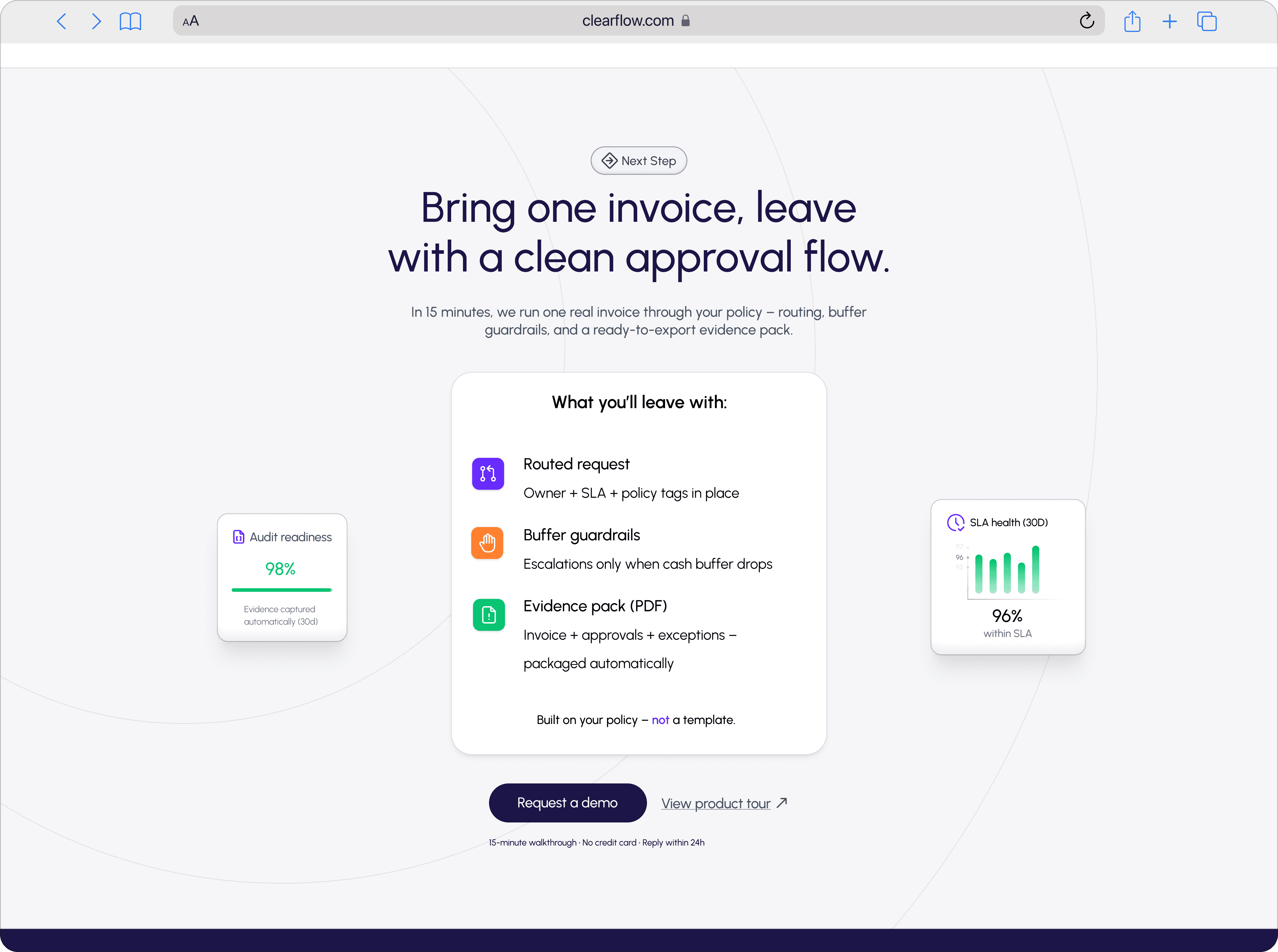
9) Final CTA — “Bring one invoice, leave with a clean approval flow”
Intent
The most powerful close for finance: a low-risk pilot.
Why this CTA converts
It reframes the demo from “sales call” to a working session
You leave with artifacts:
routed request
buffer guardrails
evidence pack PDF
UX principles used
Commitment reduction: one invoice, not full rollout
Endowed progress: “what you’ll leave with” feels tangible
Risk reversal: clear deliverables, clear timebox
UI system & visual direction
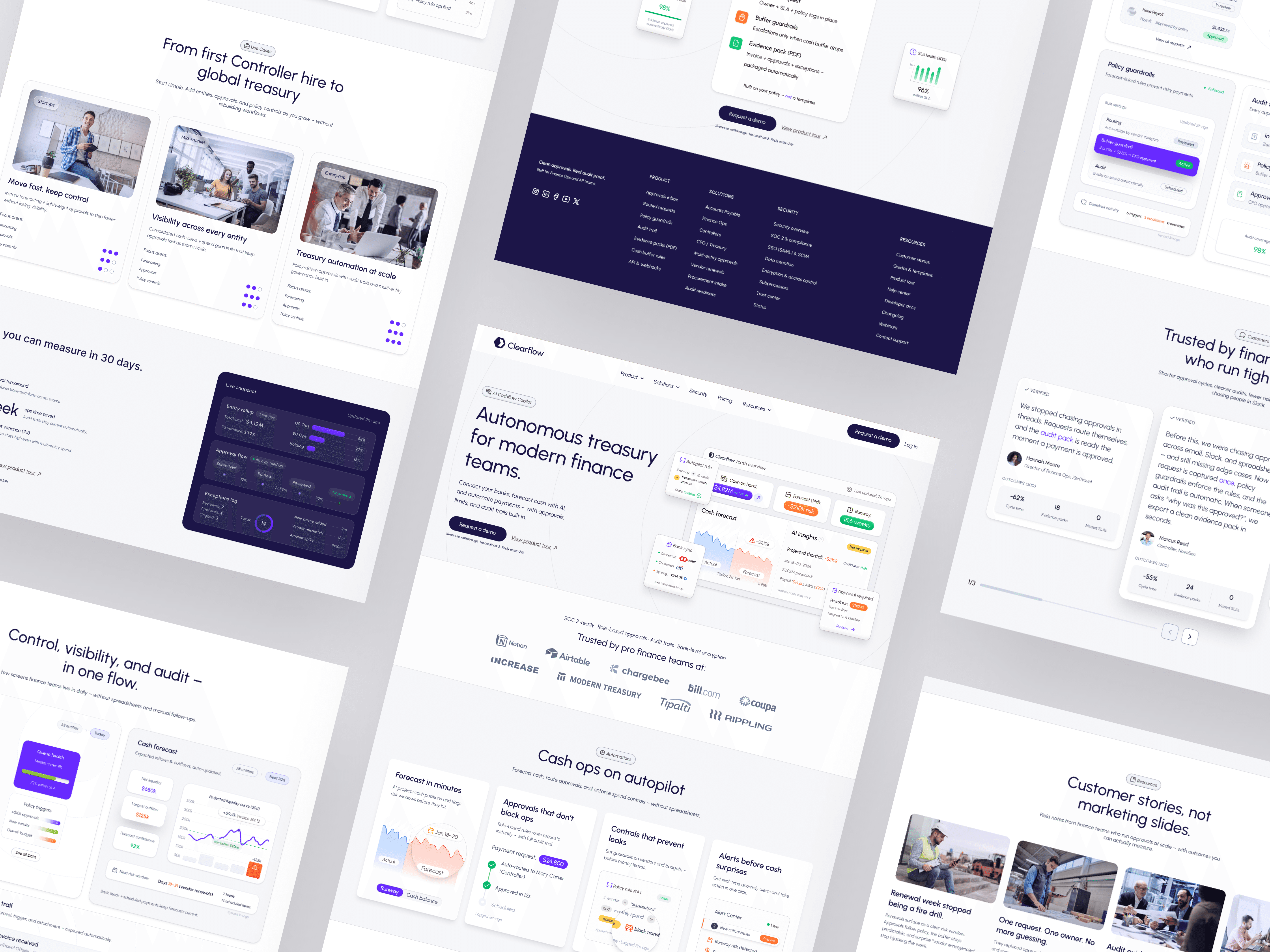
Visual concept
“Calm control.” Finance software should feel like governance, not “creative tech.”
Neutral base + restrained accent (indigo/violet)
Soft depth (subtle shadows) to communicate layering and workflow
Rounded geometry and pill tags to support “modular automation”
Component language (high-level)
Pill tags above section headlines (consistent IA signposting)
Cards with strong internal hierarchy (title → one-liner → proof element)
Data visualization as a trust cue (forecast curve, risk markers, SLA health)
Photography usage
Used as category anchors (startup/mid-market/enterprise), not as “vibes”
Kept inside consistent, rounded containers to maintain system feel
Risks & how we mitigated them
“AI hype” skepticism → anchored AI to policies, audit trails, evidence packs
Security anxiety → SOC2 + encryption + SSO pathways visible early
Complex product perception → progressive disclosure, 4 pillars, concrete workflows
Too many audiences → use-case section segments without fragmenting the story
Conversion drop due to choice overload → single dominant CTA + tour as secondary
Outcome (what this homepage is built to achieve)
This homepage is designed to:
Increase demo conversion by reducing uncertainty early
Improve sales-call quality (better-qualified prospects who already understand the workflow)
Shorten the “explain what you do” portion of discovery calls
Establish Clearflow as a governance system, not a “cash forecast widget.”

PROJECTS